Why Black Dogs Can Be Harder to Photograph and How Better Pictures Help Them Get Adopted

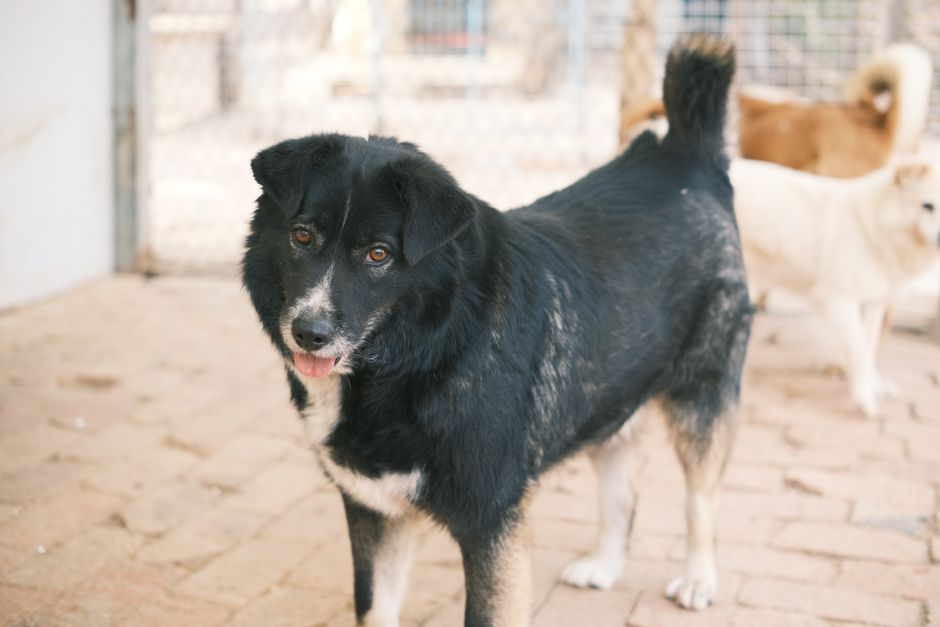
Black dogs can be harder to photograph because their dark coats may lose visible detail in dim light or against dark backgrounds. A phone camera may expose for a brighter wall or window instead of the dog's face, leaving the eyes, muzzle, and ears difficult to distinguish. The fix is usually not expensive equipment. Soft light on the face, a contrasting background, careful exposure, and a calm moment can make a black dog much easier to see.
Better pictures can help a shelter dog get noticed, but they do not guarantee an adoption. A clear image gives someone browsing listings a reason to open the profile, where accurate information about the dog's needs and personality can help them decide whether to meet. At DogDog, we see good adoption photography as a practical way to help people look beyond a hard-to-read thumbnail and get to know the individual dog.
It is important to separate a real photographic challenge from a broader claim about adoption. The term black dog syndrome is often used to suggest that black dogs are routinely overlooked because of their color. Coat color alone does not establish why an individual dog waits for a home. Age, size, health, behavior, local adopter preferences, and the information in a listing may all matter. What volunteers and foster caregivers can address directly is whether a photo shows the dog clearly and honestly.
Why a black coat can disappear in a photograph
A camera records differences in light. When dark fur receives too little light, subtle changes in its texture and shape can blend together. The dog may still be plainly visible to someone standing nearby, while the photograph reduces the face to a dark shape. That is especially troublesome in an adoption listing, where the viewer cannot step closer or wait for the dog to turn toward the light.
The background can influence exposure
Phone cameras often make automatic decisions about brightness across a scene. Picture a black dog in front of a bright window. The phone may preserve detail in the window and render the dog as a silhouette. If the dog is in a shaded kennel with a dark wall behind them, the opposite problem arises: there may be too little contrast to separate the dog's outline from the background.
Moving the dog or moving the photographer a short distance can help more than adjusting a setting. A shaded yard with light-colored pavement, for instance, may reveal the dog's shape better than either a sunlit doorway or a dark kennel corner. The aim is not the lightest possible backdrop. It is a background that lets viewers distinguish the dog's ears, body, and tail without pulling attention away from the face.
Harsh light can be as unhelpful as too little light
Bright, direct sun can create shiny patches on a smooth coat while leaving the eyes beneath the brow in shadow. Direct flash may add glare and make a dog uncomfortable. Mixed indoor lighting can also affect the coat's apparent color. Instead of trying to overpower these conditions, look for even, indirect light and turn the dog's face toward it.
Small thumbnails leave less room for ambiguity
A photo that looks acceptable when enlarged may be hard to understand on a phone screen. If the face is tiny within the frame, the eyes are dark, or kennel bars cross the muzzle, the viewer has little information to work with. This is why the lead image in an adoption profile deserves particular attention. Its job is to make the dog recognizable at a glance, not to show every detail at once.

What black dog syndrome does and does not tell us
It is reasonable to ask whether dark-coated dogs face disadvantages when their online pictures conceal their features. That is a different question from whether every black dog is adopted more slowly than every lighter-colored dog. A dog shown in an unflattering photograph could be overlooked for reasons unrelated to coat-color preference. A clear image helps remove that particular obstacle, but it cannot tell us how much coat color affects adoption in a given shelter.
For shelters, the useful response is to improve the parts of the listing within their control: the photos, the description, and the path to arranging a meeting. Do not assume a black dog is undesirable, and do not make an adoption decision based on a single picture. If you are browsing, open the profile and ask about the dog's behavior, care needs, and fit with your household. Our guide to choosing a shelter and asking useful adoption questions can help with that next step.
DogDog's clear-face, clear-context approach
Our approach to a useful adoption listing is simple: let the lead photo answer what the dog looks like, let supporting images show how the dog moves and settles, and let the written profile explain what is actually known. A picture should invite a closer look, not substitute for a thoughtful match.
- Clear face: Can you see the eyes and the shape of the muzzle without zooming in?
- Clear body: Is there another image showing the dog's full size and outline?
- Clear context: Do the photos and description distinguish observed behavior from assumptions?
- Clear next step: Can an interested person tell whom to contact or how to request a meeting?
These checks work for dogs of every color. They are particularly valuable when an underexposed image would otherwise hide the features that make a black dog recognizable.
How to photograph a black shelter dog, step by step
1. Start with the dog's comfort and the shelter's rules
Ask a staff member where the dog can safely be photographed and whether a volunteer or foster caregiver should handle the leash. Do not take a dog outside a secure area solely for a prettier setting. Keep any leash or harness needed for safety, and use treats or toys only if the dog's caregiver approves.
Give the dog time to look around before raising the camera. A nervous dog may turn away, crouch, freeze, or show other signs that the session is too much. Pause or stop if needed. A calm, ordinary image is more useful than a polished portrait obtained by forcing a pose.
2. Find soft light that reaches the face
Try open shade outdoors, a cloudy setting, or indirect light near a window. The important test is not whether the whole area looks bright. Look at the dog's eyes: are they visible, or are they lost beneath the brow? Turn the dog gently toward the light if the handler can do so comfortably, or move yourself until the face is better illuminated.
Avoid placing a bright window directly behind the dog. If that is the only available location, change your angle so the window falls to the side, or move to a different part of the room. In direct sun, look for shade rather than asking the dog to stare into a glare.
3. Choose a background that separates the outline
Look for a simple wall, a neutral blanket, grass, or light pavement. Check the edges of the dog, especially the ears, back, and tail. If they visually merge with a dark doorway or black fencing, change the angle. A background does not need to be white, and an extremely bright wall can make exposure harder. Moderate contrast is often enough.
Before taking the picture, scan the frame for clutter. A water bowl or cleaning supplies may be part of ordinary shelter life, but they need not dominate the lead photo. Keep the scene truthful while removing distractions that draw attention away from the dog.
4. Get down to the dog's eye level
Photographing from above can make a dog appear smaller and can hide the eyes under the brow. Kneel or lower the phone until the lens is near face level, while respecting the dog's space. You do not need to move so close that the dog backs away. If a handler is helping, let them stand near the camera and quietly encourage the dog to look in that direction.
Try both a direct portrait and a slight three-quarter angle. The angled view can show the muzzle and ears against the background while still keeping the eyes visible. Avoid insisting on eye contact. A relaxed glance can be more representative than an alert, uncomfortable stare.
5. Tell the camera what matters
On many phones, tapping the face on the screen tells the camera where to focus and helps set exposure. If the dog's face still appears too dark, adjust the phone's exposure control slightly, if available. Review the image before moving on: can you see the eyes, muzzle, and coat texture, or has the brighter background taken over?
Hold the phone steady and take several frames. A dog may blink, turn, or move just as you press the shutter, and a second image may capture the expression much better. Avoid heavy digital zoom, which can reduce detail. If you cannot get physically closer without disturbing the dog, make a modest crop later.
6. Take a small set of complementary images
The lead picture should show the face clearly, but it should not carry the whole story. If the dog is comfortable, add a standing full-body image so viewers can understand their build. A relaxed image can show how the dog settles. An image with a familiar caregiver or a favorite activity can offer useful context when it accurately reflects the dog's behavior.
Choose variety over a series of nearly identical portraits. Someone deciding whether to inquire may want to see both the dog's expression and their size. If the dog has distinctive markings or a characteristic ear shape, include an image where those features are visible. Do not dress the dog up or stage an interaction that misrepresents how they usually behave.
If the dog must stay inside the kennel
Not every shelter has an outdoor area or a dog ready for a photo session elsewhere. If the dog must remain in the kennel, work with the conditions rather than waiting indefinitely for an ideal setting. Ask whether staff can turn on available lights, remove visual clutter, or help position the dog where light reaches the face. Follow all handling and access rules.
Move the camera so bars do not cross the eyes or muzzle. Focusing through fencing can be difficult, especially when the phone locks onto the nearest bar instead of the dog. Tap the dog's face on the screen and try another angle if needed. Never put your fingers or phone through a kennel barrier without staff approval, and do not use flash if it startles the dog.
An honest kennel photo is better than no image, but it does not have to remain the lead image forever. If a dog later relaxes during a walk or in a foster home, a caregiver can replace the listing's main picture with a clearer one. Revisit the caption, too, so the new image and current information tell the same story.
Edit for visibility, not a different dog
Thoughtful editing can reveal details the camera captured poorly. Start by cropping empty space and distracting edges. Then, if needed, lift the shadows enough to make the eyes and muzzle visible. Check the coat and background as you go. If the dog starts to look gray, the fur becomes grainy, or the background loses all detail, the adjustment has probably gone too far.
Avoid filters that change coat color, remove markings, or obscure a visible medical condition. Do not use generated or heavily altered imagery as a substitute for a real photograph of the adoptable dog. The goal is an accurate first impression that will hold up when the adopter meets them.
Check the final image at the size people will actually see in a listing. If the eyes vanish when the picture is small, try a tighter crop of the original. If the photo remains muddy, retaking it in better light may do more than editing can.
Pair the photo with a profile that helps the right adopter
A better photograph may earn a profile view. The description has to do the next job. Include information the shelter or foster caregiver actually knows, and make clear when something has not yet been assessed. Useful details may include approximate age and size, known medical needs, observed energy level, favorite activities, and how the dog has responded to people or other animals in the settings where they have been observed.
Specific observations are more helpful than sweeping labels. If a caregiver has seen a dog settle beside them after a walk, say so. If the dog has only been observed in a kennel, avoid presenting their kennel behavior as a complete picture of how they will act at home. The same caution applies to claims that a dog is good with children, cats, or other dogs: use what has actually been observed or assessed.
A profile should also explain how to learn more. Potential adopters can ask about the dog's routine, any recommended introductions, and what support the shelter offers after adoption. If you are preparing to meet a dog, our guide to adoption events and spotting a suitable match offers practical questions to bring along.
How better photos can contribute to adoption
An adoption photo sits at the start of a chain of decisions. Someone must notice the listing before they can read it, share it, ask questions, meet the dog, and decide whether adoption is right for both of them. A clear portrait can support that first step by making the dog easier to recognize and inviting people to learn more. It cannot by itself resolve concerns about health, behavior, housing, or compatibility.
That distinction matters when assessing results. If a shelter updates photos, a useful immediate question is whether more people open or ask about the dog's profile. A later adoption may involve many factors, including staff conversations and the right person's circumstances. Avoid claiming that a single image caused a particular outcome unless there is evidence for it.
Photos can also be shared thoughtfully beyond the main listing. A volunteer might send the shelter's current adoption page to friends who are looking for a dog or, with permission, share a new image that links back to the official profile. That keeps the dog's availability and care information connected to the photo, rather than circulating an image with no reliable way to inquire. For a different way to show movement and personality, see our simple adoption video shot list.
Best practices for shelters, fosters, and volunteers
- Make the face readable in the first image. Use gentle light and check the photo at thumbnail size before publishing.
- Show the whole dog elsewhere in the listing. A full-body picture helps viewers understand size, posture, and distinctive features.
- Keep sessions low pressure. A dog's safety and comfort come before the photograph.
- Use real, current images. Replace an older lead photo when a clearer, more representative image becomes available.
- Write captions that identify what is known. Describe observed activities and qualities without promising behavior that has not been assessed.
- Protect the adoption process. Direct interested people to the shelter's official listing or contact method for current information.
DogDog's practical recommendation is to treat the photo and the profile as a pair. If one improves but the other remains unclear, the adopter still has unanswered questions. A readable face earns attention; candid information helps turn that attention into an appropriate inquiry.
Frequently asked questions
Are black dogs harder to adopt because of their color?
Coat color alone cannot explain an individual dog's adoption prospects. The phrase black dog syndrome describes a concern that dark-coated dogs may be overlooked, but outcomes can also depend on age, size, health, behavior, local demand, and how dogs are presented. Clear photos address a visible presentation problem without assuming color is the only cause.
What is the easiest way to photograph a black dog with a phone?
Put the dog in soft, indirect light with a background that contrasts with the coat. Get down to eye level, tap the face to focus, and check whether the eyes are visible before taking more pictures. Moving to better light is usually preferable to trying to brighten a very dark photo afterward.
Should I use flash for a black dog?
Try available soft light first. Direct flash can create glare on a glossy coat and may be uncomfortable for the dog. If the room is too dim, ask whether you can use a brighter area or photograph the dog near indirect window light instead.
Is a light background always best?
No. The background needs enough contrast to define the dog's outline, but an extremely bright background can cause a phone to underexpose the face. A simple, moderately lit wall, blanket, or outdoor setting often works well. Judge the result by whether you can see the dog's eyes and body shape.
Can I brighten a black dog's coat in an adoption photo?
Yes, modest edits that reveal the dog's actual features can improve a photo. Stop before the coat looks like a different color or the image becomes noisy and artificial. Keep markings and visible health features accurate so the photo represents the dog someone will meet.
Do adoption photos need a professional photographer?
No. A careful volunteer with a phone can make a useful image by choosing good light, focusing on the eyes, working at the dog's pace, and reviewing the result. Professional help can be welcome when available, but it should not delay an honest, clear listing.
What if a dog looks nervous in every picture?
Do not force a pose or try to hide what you know about the dog's needs. Pause the session and ask the caregiver when the dog is most comfortable, perhaps during a familiar routine. A natural image taken later may be clearer. The profile can explain the dog's observed behavior and what staff know about helping them settle.
A clearer picture is a fairer introduction
A black coat should not turn a dog's face into an unreadable silhouette. Soft light, visible eyes, a distinct outline, and a truthful profile give potential adopters a better opportunity to consider the dog in front of them. The point is not to promise that better photos will produce an adoption. It is to help the right person see enough to ask the next question.
If you love shelter dogs but are not behind the camera, you can still help by sharing accurate listings, asking thoughtful adoption questions, or supporting everyday care. DogDog is a free search engine that raises money to help feed dogs and provide veterinary check-ups as people search the web, one more way to make ordinary online activity count for dogs in need.